
Fake NFC and QR Stickers: How to Spot Tag Scams
Fake NFC and QR stickers on parking meters, chargers and tables lead to phishing pages. See the real risk, the warning signs and what to do if you paid.
Most NFC and QR code scams are low-tech. Someone sticks a fake NFC tag or a printed QR code over or next to the real one, and the link leads to a fake payment page. The tag cannot hack your phone. The danger is the card number or password you type on that page, so the most important habit is simple: check the link before you pay.
How a sticker swap works
The scam has four steps:
- The scammer writes a link to a page they control onto a cheap NFC sticker, or prints it as a QR code.
- They place the sticker over the real tag or code, or right next to it, often with a sign such as "Tap to pay" or "Scan to pay here".
- The page copies the look of the real operator: the logo, the colours, sometimes even the prices.
- You enter your card details. The scammer now has them, and your parking or charging is still not paid.
Some fake pages also ask for a password or try to make you install a configuration profile or an app. Never install anything from a page you reached through a public sticker.
Myths and facts
Here is what is actually true on iPhone.
- Myth: tapping a tag can hack my phone. Reading a tag cannot install anything or take data from the phone by itself. The tag only hands over a link or data, and iOS asks before opening it.
- Myth: a tag can take money from my phone. A sticker cannot pull card details out of your iPhone. Money is lost when someone types card details into a fake page.
- Myth: links from tags open on their own. With background reading (iPhone XS / XR and later), the iPhone shows a notification, and nothing opens until you tap it. Our guide to NFC on iPhone explains how background reading works.
- Myth: I should switch NFC off. There is no NFC on/off switch on iPhone, and you do not need one. The risk is the link, not the radio.
- Myth: QR codes are safer than NFC, or the other way around. Both are ways to deliver a link, and a fake sticker works the same way for both. See NFC vs QR codes for the other differences.
Where fake stickers appear
Scammers choose places where people expect to pay quickly and do not look closely:
- Parking meters and pay stations. A sticker that offers "pay by phone" is a typical example.
- EV chargers. A code that promises a quick way to start charging and pay.
- Restaurant tables. A fake menu or "pay at the table" code placed over the restaurant's own code.
- Posters and flyers. Discounts, tickets or prize draws that lead to a payment or login page.
Before you tap or scan, look at the sticker itself. Be careful if it sits on top of another code or tag, does not line up with the sign, has peeling edges, or uses a different print style or colour than the rest of the machine. Two codes where you expect one is also a warning. If a sign says "pay only in the official app or at the machine", trust the sign, not the sticker.
Checklist: warning signs in the link
The link tells you more than the sticker. Check it before you open it, and again before you type anything on the page.
Link checklist
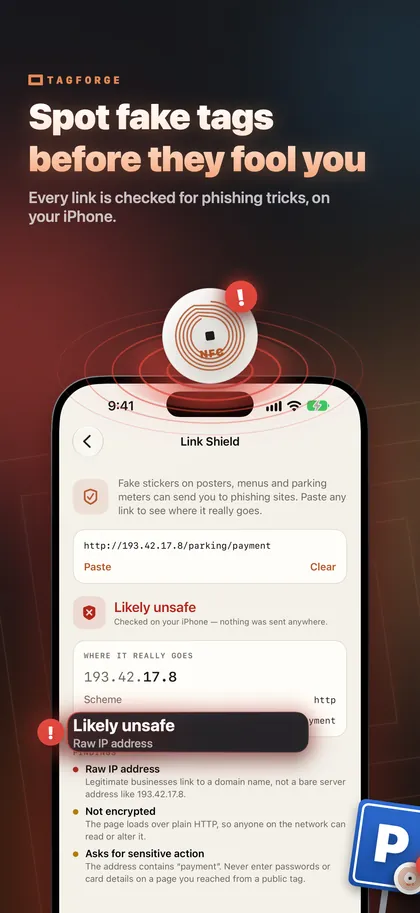
- Raw IP address. A real business uses a domain name, not a number such as 203.0.113.7.
- Plain http. The address starts with http instead of https, so the connection is not encrypted.
- Look-alike characters. Letters from another alphabet that imitate a familiar name.
- An @ in the address. The browser ignores everything before the @. In https://cityparking.example@pay-now.example/pay, the real site is pay-now.example.
- A link shortener. A short link from a link-shortening service hides the final destination.
- An unusual domain ending. An ending that does not fit the operator or the country is a reason to look more closely.
- A download. The page wants you to install a configuration profile (.mobileconfig) or an app package.
- A request for card details or a password. A real payment page asks for card details too, so stop here and confirm that you are on the operator's official site. If you are unsure, type the operator's address yourself or use their official app.
What to do if you already paid
Act quickly, in this order:
- Call your bank or card issuer. Use the number on your card or in your banking app, never a number from the fake page. Ask them to block the card and dispute the payment.
- Change any password you entered, on the real site and anywhere else you use the same password.
- Remove anything you installed. Delete a configuration profile in Settings > General > VPN & Device Management, and delete any app the page made you install.
- Pay the real fee. The fake page did not pay for your parking or charging. Pay through the official app or at the machine to avoid a fine.
- Report the sticker. Take a photo of the sticker and its location. Tell the operator or the restaurant so they can remove it, and report the fraud to the police.
- Watch your statements over the next weeks for payments you do not recognise.
How to check a tag's link with TagForge
TagForge includes Link Shield, which checks a link before you open it for the technical warning signs in the checklist: raw IP addresses, plain http, look-alike characters, a real host hidden behind an @, link shorteners, unusual domain endings and risky downloads. The check runs entirely on the iPhone. Nothing is sent anywhere, so it also works without an internet connection.
To check a tag:
- Open TagForge and tap the scan button on the Scan tab.
- Hold the top edge of your iPhone against the tag. The range is only about 1–4 cm (under 1.5 in).
- The app decodes every record on the tag and shows the full link. Nothing opens yet.
- Tap Open. Link Shield shows its result first, with each warning sign it found.
- If it lists warning signs, do not continue. Pay through the official app or at the machine instead.
To check a link from a message, an email or a website, copy it, go to Tools → Link Shield and paste it.
Know the limits. Link Shield reads the link, not the page behind it. A new scam site with https and a normal domain ending can pass every check. A clean result means "no warning signs found", not "safe to enter your card number".
If you run a business that uses tags, protect them so nobody can overwrite them, and check them regularly for stickers on top. Here is how to lock or password-protect an NFC tag.
FAQ
Can an NFC tag hack my phone?
No. Reading a tag cannot install anything or take data from the phone by itself. A tag hands over a link or data, and iOS asks before opening it. The risk is the page behind the link and what you type there.
Is it safe to scan NFC tags in public?
Usually, yes, if you treat the link with care. Check the address before you open it, and do not enter card details or passwords on a page you reached from a public sticker unless you are sure it is the official site.
How can I tell if a parking meter QR code is fake?
Look for a sticker on top of another code, peeling edges or a print style that does not match the meter. Compare the address with the operator's official website or app. When in doubt, pay at the machine or in the official app.
Should I turn off NFC on my iPhone to stay safe?
You cannot, because iPhone has no NFC on/off switch, and you do not need to. Background reading only shows a notification, and nothing opens until you tap it.